
Crisis Management Software

Riskonnect’s Crisis Management software helps you instantly turn plans into actionable checklists, mobilize your response team, and get stakeholders on the same page.

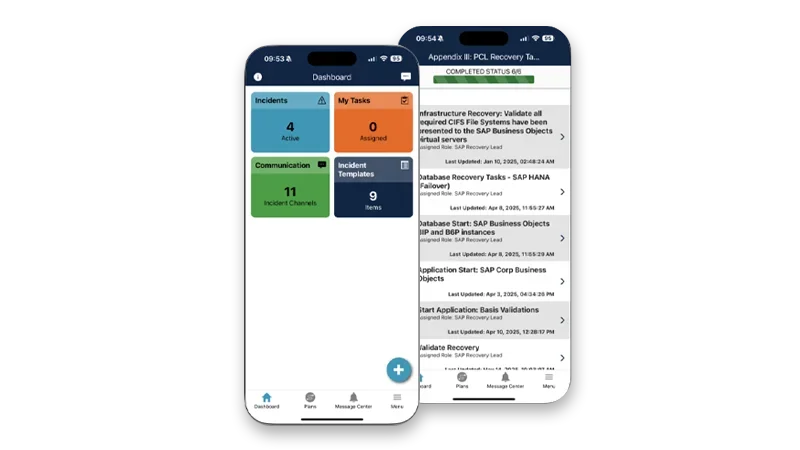
Manage incidents from anywhere. Use your phone or tablet to create an incident, activate response plans, receive notifications, and more.

Command and control an incident. Track actionable tasks to improve transparency and accountability.

Communicate securely with leaders and teams. Use encrypted chat to collaborate securely under any conditions.
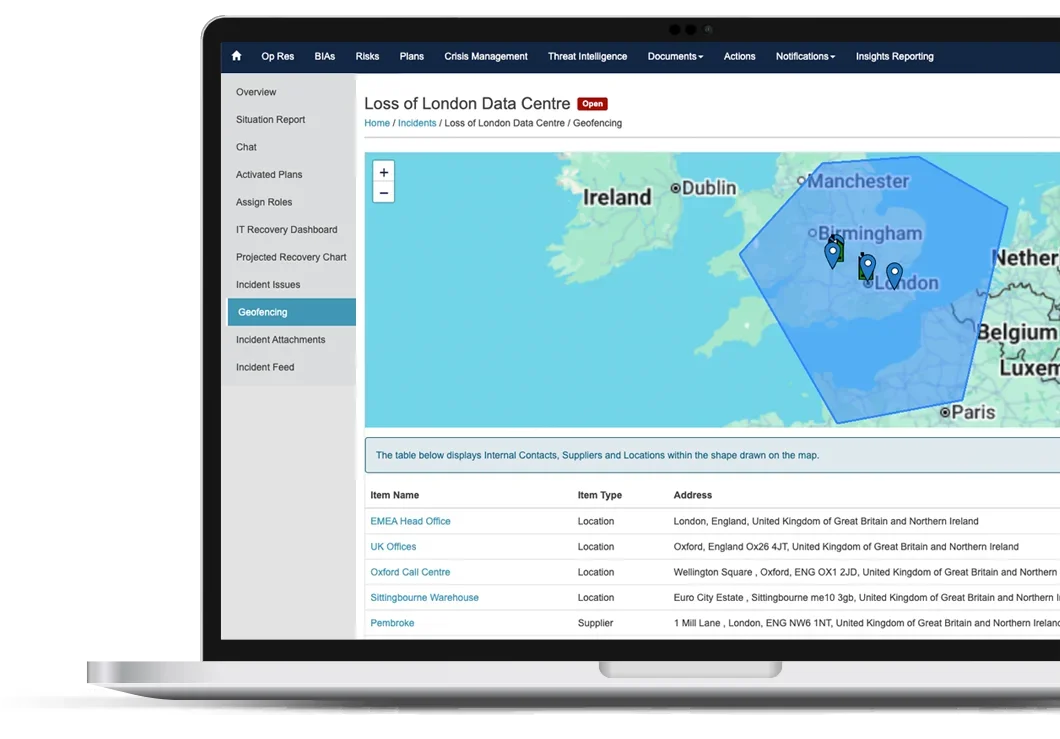
Crisis Management Software dashboard on laptop screen

Crisis Management Software

Product Highlights

  • Mobile Crisis
    Communication
    Coordinate your crisis response straight from your Apple or Android mobile device.
  • Incident Templates
    Build and save incident templates prepopulated with relevant plans, owners, and key data, so you don’t have to start from scratch in the critical first moments of a crisis.
  • Real-Time
    and Dashboard
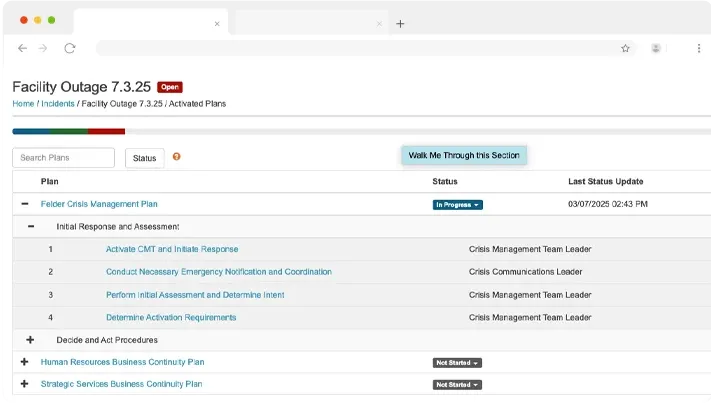
    Analyze all tasks and assets related to an incident and their recovery status with at-a-glance visibility on the IT recovery and activated plans dashboards.
  • Encrypted Chat
    Securely collaborate with your team – even when normal communication channels are disrupted – with one-on-one chat, group chat, tagging, and file sharing.
  • Projected Recovery Time
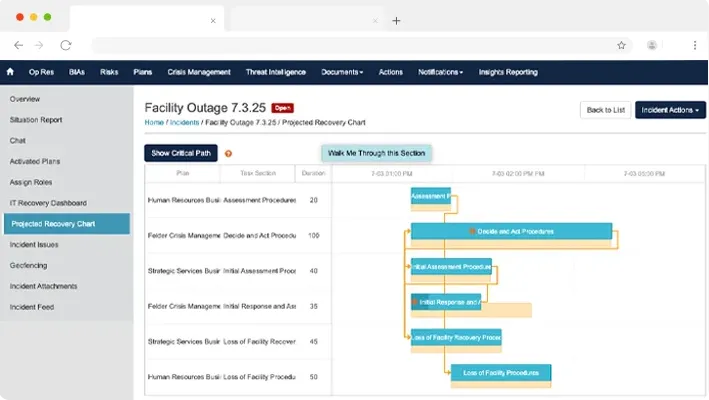
    Review how long each recovery task is taking and the downstream impacts of delays with built-in Gannt charts
  • Interactive
    Task Management
    Track and manage all of the tasks within your activated plans – and add new tasks on the fly.


Trey Braden at Randstad

Riskonnect is so easy to understand, and the mobile app and single sign-on capabilities offer a huge advantage. When everything is hitting the fan, the last thing you want to do is wrestle with your system. Even if the power is out, we still have the plans in our pockets.

Doug Fleming, Health, Safety, Business Continuity, and Sustainability, Bio-Rad

Instantly Put Your Finger

on Critical Information

Struggling to find important details amid crisis chaos? Riskonnect’s Crisis Management software collects important – and continuously updated – information in one place so you can easily find exactly what you need.

  • Instantly notify plan owners and active responders when launching an incident.
  • Streamline tasks for individual contributors and minimize training using the “My Tasks” feature on the homepage.
  • Track notes, push files, share information, and tag others in discussions.
Minimize
Downtime and Impact

How fast can you bounce back? Riskonnect’s Crisis Management software automatically connects your readiness activities with response activities to help you get back up and running quickly.

  • Use prepopulated incident templates to pull key data and contacts directly into the incident launch screen.
  • Use tags to simultaneously launch a suite of response plans during an incident, saving you precious time and effort of manually locating and activating plans one by one.
  • Instantly reassign the roles and responsibilities for owners that are unavailable.

Take Charge

of Recovery

With so much going on, how can you possibly understand where exactly you are with your response and recovery efforts? Riskonnect’s Crisis Management software helps you keep tabs on everything happening and the current status to eliminate the stress of managing multiple people, plans, and departments.

  • Watch each team’s response with visual tasks bars that clearly indicate recovery status and outstanding problems.
  • Track your complete progress to recovery with an up-to-date incident feed citing all status updates and edits throughout the entire event.
  • Automatically share situation reports with stakeholders – and remind owners to add updates.
Get Started with These Helpful Resources


EBOOK
Your Guide to
Cyber Resilience
Cybercrime is one of the biggest threats to any business in any industry. This ebook explains what a comprehensive cyber resilience plan is, what’s at stake, and how to strengthen your approach.
GUIDE
The Complete Guide to Buying
Business Continuity Software
This guide demystifies the buying process with step-by-step navigation through the entire journey to help you find the best fit for your organization.
RFP TEMPLATE
Starting an RFP process for business continuity and crisis management software?
Download Riskonnect’s list of the most critical Business Continuity & Resilience-related questions and customize it to suit your needs.

Customers with Enhanced

Crisis Management Programs Also Use

Business Continuity
Management
Conduct business impact analyses, engage stakeholders, comply with regulations, and continuously improve your readiness.
Emergency Notification
Disseminate timely and effective communications to protect people and operations during a crisis.
Threat Intelligence
Monitor global threats in real time and respond quickly and effectively to critical events.

Start anywhere. Expand everywhere.

Industry Recognition for Riskonnect

Redhand Advisors Forrester Wheelhouse Advisor

Start partnering with Riskonnect today.
Find out how Riskonnect can transform the way you view risk.

Your Crisis Management Software Questions Answered

Crisis management software is a platform for coordinating an organization’s response to a disruptive incident in real time — from the moment an event is declared through task execution, stakeholder communication, and recovery. It provides the operational infrastructure for activating response plans, assigning and tracking tasks, communicating securely with response team members, and documenting every action taken throughout the incident. The core value is speed and clarity: in a crisis, teams waste critical time looking for plan documents, determining who owns what, and chasing status updates through email and phone calls. Crisis management software eliminates that friction by putting everything needed to manage the response — plans, tasks, contacts, chat, and status dashboards — in one place accessible from any device, even a mobile phone in the field.

These two capabilities are closely related but serve different phases of an incident. Business continuity management software supports the preparation phase — building and maintaining continuity plans, conducting business impact analyses, running exercises and tests, and ensuring plans are current and ready. Crisis management software supports the response phase — the real-time activation and execution of those plans when an actual incident occurs. The distinction matters in practice: a BCM platform that’s excellent for plan development may not provide the real-time task tracking, mobile accessibility, and encrypted communication that crisis coordinators need when they’re managing an event under pressure. The strongest programs use both together — business continuity management builds the readiness, and crisis management software executes the response. Riskonnect’s platform integrates both in the same environment so the plans built in preparation are directly activated during response.

An incident template is a pre-built configuration that populates the launch screen for a specific type of incident — pulling in the relevant response plans, task owners, contact information, and key data fields so that the response team doesn’t have to locate and assemble this information from scratch during the critical first minutes of a crisis. Templates can be created for any recurring incident type: a cybersecurity breach, a severe weather event, a supply chain disruption, a facility emergency, or a reputational crisis. The practical value is significant: the speed and accuracy of the initial response is largely determined by how quickly the right people are notified and understand their roles. A well-designed incident template eliminates the setup time that slows down activation and reduces the risk of important steps being missed when the pressure is highest.

Projected recovery time is a running estimate of when each active response task — and by extension, the affected business service — will be fully restored. It’s one of the most important metrics a crisis coordinator needs during an active incident: stakeholders at every level want to know not just what’s happening, but when things will be back to normal. Crisis management software tracks projected recovery time by monitoring the status of each task in the activated response plans, calculating the downstream impact of delays in sequential tasks using built-in Gantt chart views, and surfacing a consolidated recovery timeline that shows which workstreams are on track and which are at risk of missing their recovery targets. This visibility allows crisis managers to intervene early — reassigning resources, escalating bottlenecks, or adjusting stakeholder expectations — before delays compound.

Encrypted chat provides a secure, internal communication channel for crisis response team members that operates independently of the organization’s standard email, messaging, and phone infrastructure. During certain types of incidents — particularly cyberattacks, network outages, or events that compromise normal communication systems — standard channels may be unavailable, unreliable, or potentially compromised. Even when standard channels remain available, encrypted chat provides a contained, auditable record of response communications that keeps sensitive incident details out of general corporate email threads and ensures that only authorized response team members are part of the conversation. Riskonnect’s crisis management platform includes one-on-one chat, group chat, message tagging, and file sharing — all encrypted — so crisis teams can collaborate securely under any conditions, including when everything else is down.

A situation report (SitRep) is a structured summary of an incident’s current status — what happened, what actions have been taken, what is still in progress, and what the current projected recovery timeline is — distributed to stakeholders who need to be informed but aren’t directly managing the response. Situation reports are a standard expectation in professional crisis management: executives, board members, regulators, and other stakeholders expect regular, structured updates during an incident rather than ad hoc messages. Generating these manually under pressure is time-consuming and inconsistent. Crisis management software automates situation reports by compiling current task status, notes, and timeline data from the incident record and distributing them to configured recipient lists on a schedule — while also sending automated reminders to task owners to add status updates so that the information in the report stays current.

Task management during a crisis is fundamentally different from routine project management: the urgency is higher, the situations are dynamic, tasks may need to be added on the fly, and the people responsible for tasks may become unavailable at any moment. Crisis management software addresses this with interactive task tracking that shows the real-time status of every task in an activated response plan, visual recovery indicators that make it immediately apparent which tasks are complete, in progress, or overdue, and the ability to add new tasks, reassign owners, and adjust timelines mid-incident without disrupting the overall plan structure. Riskonnect’s platform includes a “My Tasks” homepage feature that gives individual contributors a simple, focused view of what they specifically need to do — minimizing the training burden and ensuring that even infrequent responders can navigate their responsibilities without needing guidance from the crisis coordinator.

In a well-integrated resilience program, a threat detected by intelligence monitoring should trigger an alert, which should enable rapid plan activation, which should automatically notify the response team. When these three functions operate in separate systems, each handoff adds time and creates opportunities for miscommunication. Riskonnect connects threat intelligence, emergency notification, and crisis management in the same platform — so detecting a relevant threat can automatically trigger a notification to the response team, and activating an incident can simultaneously send emergency notifications and pull in the relevant response plans, all without switching tools. This end-to-end connection is what reduces the gap between when a threat materializes and when the organization is actively managing its response.

A crisis management plan is only as good as the organization’s ability to execute it under pressure. The most common failure modes aren’t in the planning — they’re in the execution: plans that aren’t current, owners who don’t know their roles, response teams that can’t communicate when normal channels are disrupted, and coordinators who can’t get a real-time picture of what’s happening across multiple workstreams. Software addresses each of these by ensuring plans are maintained in a live, accessible system rather than static documents; by making it easy for individual contributors to see and act on their specific responsibilities; by providing communication tools that function when normal channels don’t; and by giving coordinators a consolidated view of incident status in real time. For practical guidance on what goes into a plan that works under real conditions, see How to Create a Crisis Management Plan That Works.

The most important evaluation criterion for crisis management software — one that’s easy to overlook when evaluating features in a demo — is usability under pressure. Crisis response teams typically include many people who rarely use the software outside of drills and actual incidents. If those users can’t navigate the system quickly without training or support, the platform fails at exactly the moment it matters most. Beyond usability, key criteria include: mobile accessibility so coordinators and responders can manage incidents from any device; integration with emergency notification so alert distribution and incident activation happen from the same platform; incident template capability for the specific crisis types your organization faces; encrypted communication for scenarios where standard channels are compromised; and connection to your BCM program so that plans activated during a crisis reflect the most current, tested versions. The BCM and resilience RFP template covers crisis management requirements alongside the broader resilience program evaluation.